
A secure meeting room is only as resilient as the systems that carry, control and store its conversations. Secure government video conferencing design brings together authentication, encryption, access management, room technology and deployment choices to protect meetings while supporting operational needs. The right solution also accounts for where meeting data is processed and stored, and who can administer it.
Government video conferencing design involves more than cameras and displays. It brings together conferencing platforms, room audio and video, network infrastructure, and security controls, shaped by the room, its users, and the sensitivity of its meetings. This article explains how authentication and compliance requirements inform the design, how cloud and locally hosted options differ, and why data sovereignty belongs in early planning. It also covers how room dimensions, accessibility, interoperability, and lifecycle needs affect system fit. Together, these considerations provide a clearer basis for planning secure, usable meeting environments across government operations.
Key Takeaways
- Align authentication, meeting entry controls and user permissions with the sensitivity of each meeting.
- Identify the compliance frameworks that apply before selecting a conferencing platform.
- Plan room equipment and third-party integrations around the space, meeting purpose and security requirements.
- Weigh the control and operational demands of self-hosted, cloud and isolated deployment models.
- Include data location, retention, recording and administrative access in the security design from the outset.
Authentication and access control
Secure meeting access depends on identity verification, participant permissions, and controlled data flows. A government conferencing platform should coordinate these controls across meetings, collaboration tools, and network architecture.
Multi-Factor and Role-Based Access
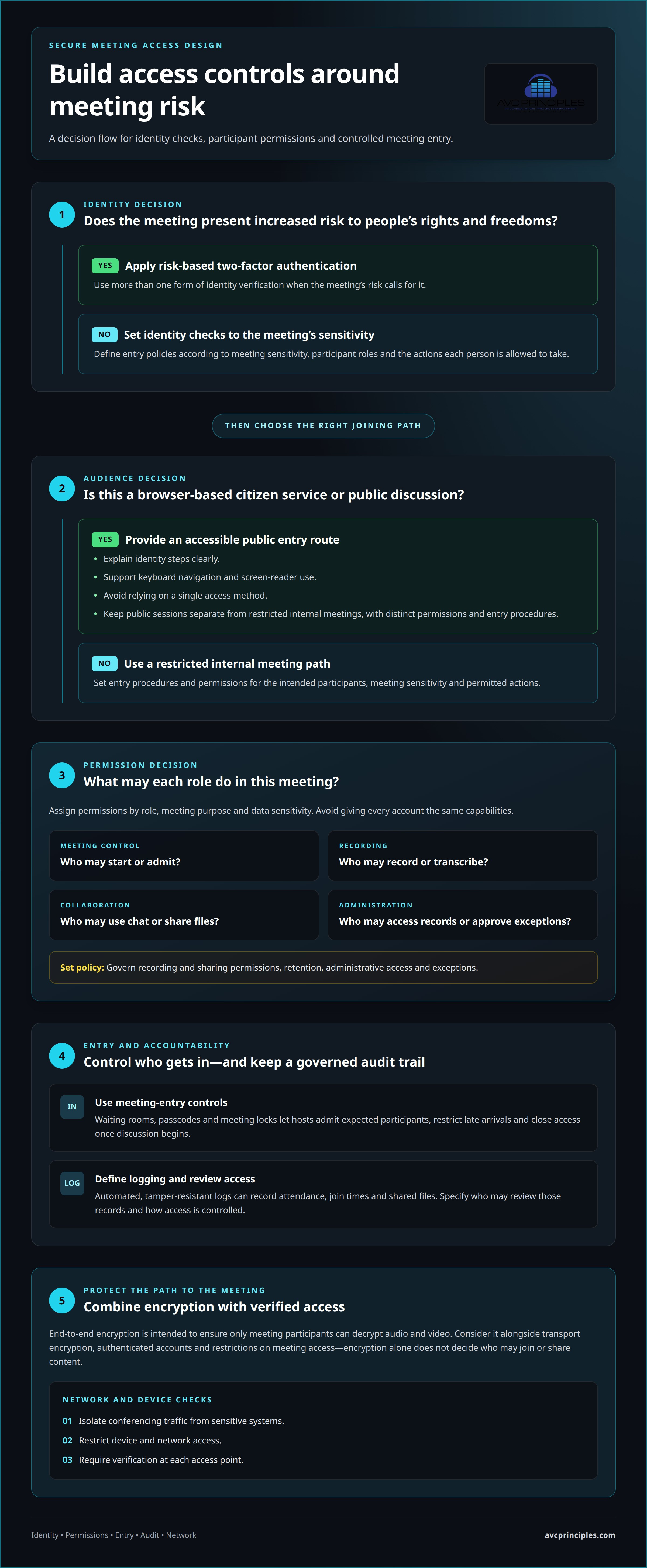
Multi-factor authentication (MFA) combines more than one form of identity verification, while role-based access control limits permissions according to a user’s role. Apply risk-based two-factor authentication when a meeting presents increased risk to natural persons’ rights and freedoms. Set access policies according to meeting sensitivity, participant roles, and permitted actions, rather than giving every account the same capabilities.
Browser-based citizen video services need a clear route into public discussions without weakening meeting controls. Design the joining process to explain identity steps, support keyboard navigation and screen-reader use, and avoid relying on a single access method. Separate public sessions from restricted internal meetings with distinct permissions and entry procedures. Accessibility belongs in the platform architecture alongside authentication and confidentiality.
Secure Meeting Controls
Secure configuration defines who may start meetings, admit participants, record, transcribe, use chat, or share files. Set permissions for each function according to meeting purpose and data sensitivity, then establish administrative policies for exceptions. How should professionals design controls for recording, transcription, chat, and file sharing? Assign access by role, set recording and sharing permissions, and govern retention and administrative access.
Waiting rooms, passcodes, and meeting locks add control over entry. A host can admit expected participants, restrict late arrivals, and close access once the discussion begins. Automated, tamper-resistant logs can record attendance, join times, and shared files to provide an audit trail. Logging policies should specify who can review those records and how access is controlled.
End-to-end encryption is intended to ensure that only meeting participants can decrypt audio and video feeds. Consider it alongside transport encryption, authenticated accounts, and restrictions on meeting access. Encryption alone does not determine who may join or share content. How should professionals design network segmentation, endpoint security, and zero-trust measures? Isolate conferencing traffic from sensitive systems, restrict device and network access, and require verification at each access point.
FIPS, FedRAMP, DISA, HIPAA, and ISO compliance
Start a compliance review by identifying which frameworks apply to the agency, the information handled, and the deployment. For public-sector procurement, assess the platform’s evidence and technical controls against those requirements.
Compliance Framework Coverage
Shortlisting can include FedRAMP, FIPS 140-3, DISA requirements, HIPAA, GDPR data residency and a national equivalent. Their relevance depends on the agency’s obligations and the platform’s intended use. HIPAA is identified as relevant to public health agencies. Commercial conferencing applications may not meet FedRAMP, FIPS or SOC standards, so evaluate the specific platform and service boundary.
How do FedRAMP, FISMA, NIST SP 800-53 and CMMC apply? Map each named framework to the agency’s procurement requirements and intended use; don’t assume one designation establishes compliance with another. Treat ISO requirements the same way: include them only where the agency’s requirements call for them.
Encryption Standards and Data Protection
FIPS encryption guidelines are a relevant criterion in government security evaluation, and FIPS 140-3 belongs on the framework shortlist where applicable. How should teams assess encryption at rest and in transit? Document separately how meeting media and associated records are protected in transit and when stored, then compare the controls with the applicable framework. The criteria here name no particular cipher for either state.
That distinction matters for confidential recordings, transcripts, and shared files. A platform assessment should identify the data types it handles and include their protection in the compliance review. Do not treat a general encryption statement as proof that every data type or system component receives the same protection.
Impact Levels and Data Classifications
Platform suitability depends on the information the agency intends to process and the authorization requirements for that deployment. The framework review should identify the data classifications and impact levels permitted for the specific use. Do not infer supported classifications from a general security label or a certification tied to a different service boundary.
For example, a public health agency should consider HIPAA’s relevance when defining its intended use. The procurement assessment should connect that use to the platform’s documented controls and approved scope. This provides a basis for deciding which meetings, files, and records belong in the system.
Compliance and Audit Capabilities
During procurement, compare platform evidence with the agency’s requirements, including applicable framework coverage, encryption controls, data residency, and the scope of any independent certification. GDPR is identified as a standard for which government conferencing platforms should have independent certification. Tie the evidence to the specific service being evaluated, not to a broader product family.
How should professionals evaluate security, compliance, features, and cost? Map requirements to platform controls, review the applicable certification scope, and assess whether the features support the agency’s meeting needs. Cost is one procurement factor to weigh alongside compliance and operational fit, not a substitute for either.
Who Needs Government-Grade Video Conferencing?
Government meeting rooms serve varied operational purposes, from confidential briefings to public presentations. Room systems and third-party integrations should reflect each meeting’s participants, information, and workflow. A control-room discussion, for example, may need a different display layout and access boundary from a public information session. Design should connect the conferencing platform with room equipment and approved software without assuming every system belongs on the same network.
The BSI’s KomTK provides a useful lifecycle reference for telecommunications systems with increased security requirements. It covers planning through decommissioning, rather than treating procurement as the end of the design process. The BSI replaced its 2020 Video Conferencing Systems compendium with KomTK on 5 March 2025. KomTK also replaced the previous Technical Guideline Secure Telecommunications Systems, TLSTK II, and the earlier video conferencing compendium.
For room planning, match audio and video equipment to room dimensions and seating. A display positioned for a boardroom table may not serve a larger presentation space as well. Also account for meeting purpose, security, usability, interoperability, scalability, support, and accessibility. These criteria help determine where cameras, microphones, displays, and control interfaces belong, and how users move between presentation and discussion modes.
Displays and presentation systems should make shared material legible from the intended seating positions. Before finalizing equipment, map sightlines, screen placement, and speaker locations against the room layout. A room used for both remote collaboration and in-person briefings, for example, may need clear views of participants and shared content. The aim is not simply to display an image, but to support the meeting’s presentation and decision-making tasks.
Give each third-party integration a defined role in the system architecture. Identify which software connects to conferencing, presentation, or room-control functions, then document the data and permissions each connection requires. An integration used to present a briefing should not automatically receive broader access to meeting functions. Network boundaries and approved interfaces help keep components distinct while enabling authorized collaboration.
Intuitive AV design reduces operational friction by making common room tasks clear. Users should be able to identify how to join a meeting, select a presentation source, and adjust room audio without navigating unrelated controls. Consistent interface logic across government rooms can help staff who move between locations. Accessibility also belongs in the design: controls and displays should support the range of expected users, including participants joining remotely.
The right design for each organization depends on room geometry, meeting use, integrations, and lifecycle requirements. Bringing these factors together produces a coherent room system that considers equipment, software, and encrypted communications as parts of one operational environment.
Self-hosted, private-cloud, government-cloud, and air-gapped deployment
Deployment determines where a conferencing platform runs and how the agency governs its infrastructure. The appropriate model depends on data sensitivity, operational needs, and the level of control required.
Deployment Model Options
Government agencies can assess self-hosted, private-cloud, government-cloud, and air-gapped models against the same requirements: data handling, administration, connectivity, and operational responsibility. A self-hosted system runs within agency-controlled infrastructure. Cloud models run in a cloud environment, while an air-gapped design isolates conferencing from external networks. The deployment should match how sensitive meetings are conducted.
For each model, map where meeting data is processed and stored, who administers the platform, and how users connect. These distinctions help determine whether a deployment supports the agency’s intended use and data sovereignty requirements.
On-Premise and Hybrid Approaches
On-premise deployment gives the agency direct control over the infrastructure and compliance responsibilities. On-premises systems account for about 27 percent of the overall video conferencing market in 2026. A private-cloud approach uses cloud infrastructure designated for an organization, while a hybrid design combines environments to support different operational needs.
In a hybrid arrangement, an agency might separate meetings with different sensitivity levels across distinct environments. The design must define how information moves between them and which administrative controls apply. That boundary is a core part of the architecture, not an incidental connection.
Deployment Tradeoffs
Cloud-based deployment represents roughly 73 percent of the overall video conferencing market in 2026. Cloud deployment offers automatic scalability, while on-premise deployment requires manual hardware upgrades. This difference matters when demand changes: the cloud model can scale without the same hardware-upgrade process, while on-premise infrastructure places those capacity decisions with the agency.
On-premise deployment may give an agency more direct control over its infrastructure, but compliance still requires careful attention. Government teams should weigh that responsibility against their need for direct infrastructure control. Neither model eliminates the need to align administration, data handling, and meeting use.
Data Sovereignty and Air-Gapped Hosting
Data sovereignty requires a clear view of how meeting information is processed, stored, and managed. For each deployment, establish data residency, retention policies, recording permissions, and administrative access. A self-hosted system can place those decisions within agency-controlled infrastructure, while an air-gapped environment isolates conferencing from external network connections.
Isolation changes how a system connects to users and supporting services, so account for those dependencies during design. An air-gapped deployment may suit a sensitive operational context where separation is central; a connected cloud environment may better support changing demand. The governing factors are the agency’s security requirements and its capacity to operate the chosen model.
Government video conferencing security and sovereignty
Commercial or foreign-hosted conferencing can create governance gaps if an agency cannot establish where meeting data is handled, who administers it, or which controls apply. Assess the platform’s data flows, administrative access, and security architecture before using it for government meetings.
Commercial Platform Security Risks
A general security claim alone is not enough to assess a commercial platform. Assess the specific service and deployment intended for meetings, including encryption, access controls, recording permissions, and administrative policies. Commercial availability alone does not establish that a platform’s controls suit an agency’s operational requirements or information sensitivity.
For public authorities, transport encryption is a baseline identified in BSI technical guidelines. End-to-end encryption should ensure that only meeting participants can decrypt audio and video feeds. Assess both protections alongside how the conferencing solution handles recordings, transcripts, chat, and shared files. This connects media security with the broader governance of meeting information.
Foreign-Hosted Data Sovereignty Risks
Foreign hosting can complicate an agency’s understanding of where meeting data is processed, stored, and managed. The risk assessment should establish data residency, retention policies, recording permissions, and administrative access. These details matter for citizen services as well as confidential discussions. If hosting or administration crosses jurisdictional boundaries, the agency needs a clear account of which systems and personnel can access its information.
Sovereignty concerns more than hosting location. It also involves who controls system administration, how records are retained, and which parties can manage the conferencing environment. Trace meeting data from capture through storage and deletion, including recordings and shared materials. This makes the operational boundary visible and helps agencies align deployment decisions with data governance requirements.
Room devices also form part of the security boundary. Protect cameras, microphones, displays, and controllers through network segmentation, updates, access restrictions, and monitoring. For example, separating conferencing devices from unrelated agency systems can limit unnecessary network connections. Security measures should apply at both organizational and user levels, linking system administration with meeting practices.
For a sovereignty-focused system plan, discuss government conferencing infrastructure design as part of the wider security architecture.
AVC Principles
AVC Principles helps government organizations translate conferencing security requirements into coordinated AV and ICT system designs. The engineering consultancy develops systems from concept through commissioning, bringing room technology, infrastructure, and operational needs together in a considered design.
Turn to AVC Principles when planning a new government meeting environment or integrating conferencing into a command center. AV Systems Design and ICT Infrastructure Design address the room and network as connected parts of the solution. Command and Control Center Design supports environments where communications must fit broader operational workflows. The project requirements and deployment context determine the scope.
To discuss applying these design considerations to your government conferencing project, contact AVC Principles.
Set the Direction for Your Next Project
The next step is to turn security priorities into a design brief that guides planning, integration, and commissioning. A secure government video conferencing design should reflect how teams meet, the rooms they use, and the operational boundaries around meeting information. Clear decisions during planning help align technology with agency requirements.
AVC Principles supports this work through AV Systems Design and ICT Infrastructure Design, bringing room technology and underlying systems into a coordinated design. Staged Environment Engineering can also contribute when meeting spaces are part of a broader operational environment. The project’s needs determine the appropriate scope.
Before planning begins, define the meeting use cases, required deployment model, data governance priorities, and room requirements. These decisions provide a practical basis for a design that supports secure collaboration and everyday use.
Contact AVC Principles to discuss your needs and take the next step toward a well-planned government meeting environment.
Frequently Asked Questions
What Are Government Meeting Room Solutions?
Government meeting room solutions combine conferencing software, room audio and video, displays, network infrastructure, and access controls. Their configuration depends on the space and meeting purpose. A briefing room, for example, may need clear presentation sightlines and controlled participation, while a public-facing room may prioritize accessible citizen interaction. A coordinated design considers equipment placement, user workflows, network connections, and support for both in-person and remote participants.
What compliance certifications should a government agency look for?
There is no single certification that applies to every agency or use case. Start by identifying the frameworks relevant to the agency’s information and procurement requirements, then assess the platform’s evidence against them. FedRAMP, FIPS 140-3, DISA requirements and HIPAA may be relevant in different contexts. Review the certification’s scope and the specific service being considered. An acronym alone doesn’t establish that a platform meets every requirement.
Why is call quality especially important in government settings?
Clear audio and video help participants follow briefings, contribute to discussions, and understand decisions. Poor room acoustics, microphone placement, or display sightlines can make a meeting difficult to use, even when the conferencing software works. A hybrid meeting, for example, needs room equipment arranged so remote participants can hear speakers and follow shared material. Design should account for room dimensions, seating, meeting format, and the intended presentation workflow.
What security requirements apply to government video conferencing systems in the United States?
Applicable security requirements depend on the agency, meeting purpose, information handled, and deployment. Identify which frameworks apply, then assess identity controls, encryption, administrative access, data handling, and room-device protections against those requirements. A platform used for public discussions may have different needs from one used for sensitive internal meetings. Do not treat a general security claim as proof of suitability for every agency environment or information classification.
How should a professional design a secure government video conferencing architecture for identity, MFA, and access controls?
A secure government video conferencing design starts by mapping user groups, meeting sensitivity, and permitted actions. Multi-factor authentication can strengthen identity checks, while role-based permissions distinguish hosts, participants, and administrators. For example, a participant may join and view shared material without having authority to record or manage attendees. Connect identity rules with meeting entry controls and administrative oversight so permissions remain consistent across the platform and its integrations.
What information should an agency provide to professionals procuring, deploying, and authorizing a secure video conferencing system?
For a secure government video conferencing design, professionals need the intended meeting use cases, room layouts, participant groups, information types, required integrations, and deployment constraints. Agencies should also provide relevant procurement and authorization criteria, along with expectations for recordings, transcripts, shared files, and administration. A room drawing can clarify seating, display positions, and network connections. These inputs help align system design with operational workflows and identify decisions that depend on agency policy or deployment model.
What incident response, logging, retention, and audit requirements apply to government video conferencing?
Establish these requirements through the agency’s applicable policies and the system’s intended use. Define how incidents are escalated, who reviews records, and how meeting data is retained or deleted. Audit logs may capture attendance, join times, and shared files for administrators to review. Define ownership of recording permissions and log access as well. The resulting process should connect platform records with the agency’s security and records-management practices.
What accessibility and interoperability requirements apply to U.S. federal and state government video conferencing?
Requirements depend on the agency and the service being designed, so consider accessibility and interoperability during planning. Evaluate whether users can operate meeting controls and follow shared content through the intended participation methods. For interoperability, map how conferencing software connects with room systems, networks, and approved third-party tools. A citizen-facing service, for example, may need a clear browser-based joining path, while an internal room must work with its planned displays and audio equipment.