
A signage network can fail long before a display goes dark. Unclear responsibilities, weak connectivity, or an unsuitable management architecture can disrupt content across an entire deployment. Effective digital signage network design starts with operational requirements, not display count alone.
That distinction matters when AV, IT, facilities, and content teams share responsibility for one system. Cloud, on-premises, and hybrid platforms each affect maintenance, security, and how content reaches displays. A design that works on paper must also account for network constraints, outages, and the people responsible for keeping it operational.
This guide provides a practical framework for documenting requirements, comparing architecture and connectivity options, and validating the proposed system against technical and operational needs. It covers displays, media players, management platforms, network infrastructure, security controls, and team responsibilities. Considering these elements together helps organizations make informed design decisions and reduce avoidable gaps between planning and deployment.
Key Takeaways
- Start digital signage network design with audience needs, content purpose, location conditions, and clearly assigned ownership.
- Map how content moves from the management platform through playback devices and network connections to each display.
- Compare cloud, on-premises, and hybrid models by administration, connectivity dependency, and resilience requirements.
- Plan security and continuity controls around project risks, including access, updates, monitoring, and approved remote connections.
- Use coordinated diagrams, device schedules, interface definitions, and commissioning tests to make the design verifiable.
Digital Signage Network Design Starts with Operational Requirements
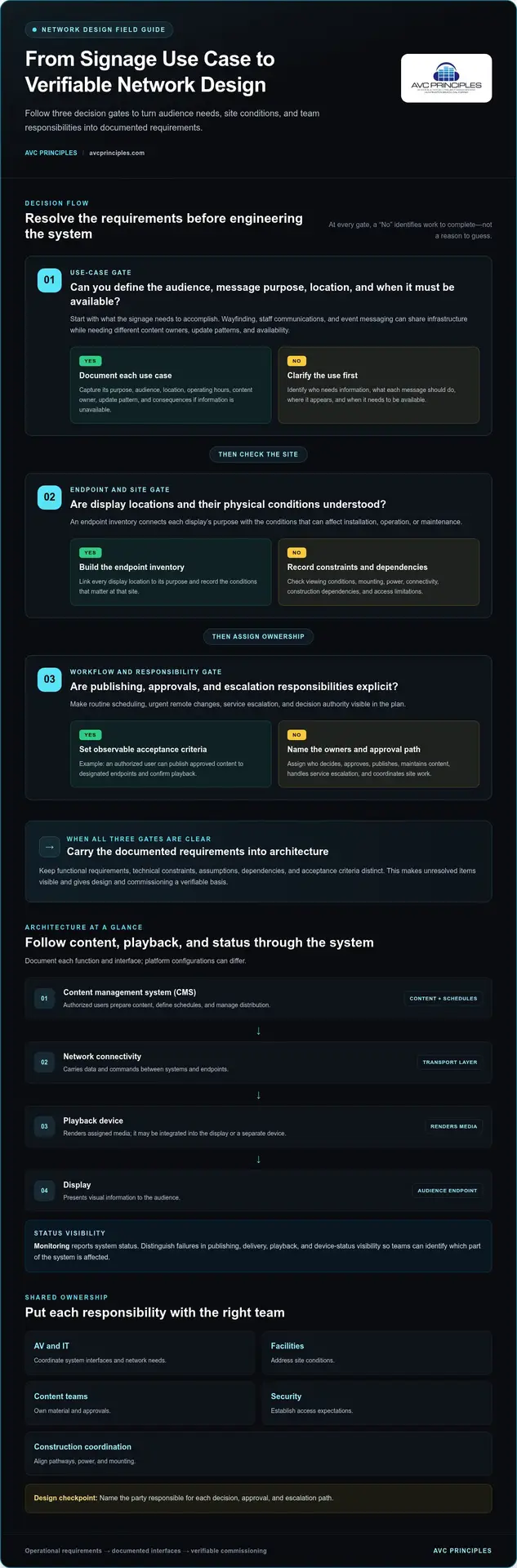
A venue’s signage system must serve its audience before it can be engineered effectively. Identify who needs information, what each message should accomplish, where it will appear, and when it must be available. A concourse wayfinding screen, a staff communications display, and an event message board may share infrastructure, but each has different content owners, update patterns, and consequences if information is unavailable.
A digital signage network is the coordinated system of displays, playback devices, content management, and connectivity that delivers and supports visual information across one or more locations. An individual display is only one endpoint. The design must account for content workflows, communications paths, access, and operational responsibility as well as screen placement. The overview of Digital signage describes common applications and networked and standalone arrangements. Project requirements determine which arrangement is appropriate.
Translate Signage Use Cases into System Requirements
Turn each use case into a documented requirement, then distinguish what the system must do from conditions that may limit it. Functional requirements describe intended behavior. Technical constraints capture existing conditions, such as available connectivity or mounting locations. Record assumptions, dependencies, and acceptance criteria separately so unresolved items remain visible instead of being treated as settled.
- Wayfinding: Define the information to present, the relevant locations, and who maintains directional content.
- Information and corporate communications: Identify audiences, content owners, approval steps, update frequency, and roles authorized to publish or revise messages.
- Venue messaging: Document event-related content, scheduled playback needs, and who can authorize changes during operations.
Specify operating hours and update workflows, including routine scheduling, urgent remote changes, and service escalation. Make acceptance criteria observable. For example, an authorized user should be able to publish approved content to designated endpoints and confirm playback. This gives the project team a testable basis for design and commissioning.
Map Endpoints, Stakeholders, and Site Conditions
Create an endpoint inventory that links each display location to its purpose and physical conditions. Record viewing conditions, mounting requirements, power availability, and connectivity at the location. Note construction dependencies and access limitations that could affect installation or maintenance. These details connect the use case to a feasible system plan without assuming that every location can support the same configuration.
Assign responsibilities across AV, IT, facilities, content, security, and construction. AV and ICT coordination defines system interfaces and network needs. Facilities addresses site conditions, content teams own material and approvals, security establishes access expectations, and construction coordination aligns pathways, power, and mounting. Name the party responsible for each decision, approval, and escalation path.
Where signage is part of an event or venue environment, coordinate it with the wider staged system. The staged environment engineering guide provides relevant context for integrating signage with event AV and site requirements. Carry these operational decisions into the architecture and documentation that follow.
How Digital Signage Network Architecture Connects Players, Displays, and Management
Architecture describes how content and control move through a signage system. A typical sequence begins in a content management system (CMS), where authorized users prepare material and define schedules. The platform distributes content or playback instructions to an endpoint. A playback device renders the material, and the display presents it to the audience. The sequence varies by platform and configuration, so document each function and interface rather than assuming a universal arrangement.
The CMS governs content and schedules, the playback device renders media, the display presents it, the network carries data and commands, and monitoring reports system status. These are functional roles, not a required set of separate products. Centralized management is the control layer; the physical network is the transport layer connecting systems and endpoints. Distinguishing the layers helps teams identify whether a failure affects publishing, delivery, playback, or device-status visibility.
Define the CMS, Playback, and Display Roles
The CMS supports content preparation, approval, scheduling, and distribution. Depending on the platform, a player may download scheduled media in advance, receive updates when connected, or use another delivery method. The playback device decodes and presents assigned content. The display provides the viewing surface, with capabilities that depend on the equipment and configuration.
Some displays include integrated playback; other designs use a separate player connected to each display. Integrated designs consolidate components at the endpoint. Separate players provide distinct devices to schedule and manage, with additional physical connections to coordinate. Neither approach suits every project. Document where content is stored, what happens during a lost connection, how schedules are applied, and which system reports playback or device status. Verify those behaviors against platform and project documentation.
Coordinate Signage with AV and ICT Infrastructure
Map each endpoint’s path to the CMS and any monitoring functions with IT stakeholders. Define addressing, network segmentation, permitted communications, and remote-access routes in coordination with the enterprise network design. Where the architecture supports it, distinguish content traffic from management traffic and record which team owns each network interface. This makes dependencies visible before deployment.
Choose connectivity based on site conditions and operational requirements. Wired connections may suit fixed endpoints with planned network access. Wireless connectivity may fit locations where cabling is constrained, subject to coverage and network policy. Cellular service may suit isolated or distributed endpoints where other connectivity is impractical, provided coverage, data use, and remote administration are considered. Do not treat any option as a default without assessing its suitability.
Define the purpose of monitoring. Decide which conditions matter, such as a device becoming unreachable or scheduled content failing to play, and identify who reviews alerts and initiates escalation. The ICT infrastructure design guide provides broader context for aligning signage with enterprise network planning. For projects that require coordinated AV and ICT architecture, AVC Principles’ AV systems design and engineering can help translate system interfaces into documented project requirements.
Cloud, On-Premises, or Hybrid: Compare Digital Signage Network Models
Choosing where signage management runs is a decision about administration, dependencies, and operational control. It is separate from how endpoints connect: cloud-managed, on-premises, and hybrid systems can use wired, wireless, or cellular transport when supported by the platform and site. Digital signage network design should compare the management model against organizational requirements, rather than assume that one hosting choice dictates the connection type.
The key resilience question is what continues to work when a connection or service becomes unavailable. A player might retain scheduled content locally, for example, while new updates or centralized monitoring depend on a live connection. Confirm this behavior for the selected platform and configuration. The table summarizes common trade-offs, not guaranteed capabilities.
| Model | Ownership and administration | Dependencies and resilience considerations | May suit |
|---|---|---|---|
| Cloud-managed | Management is hosted externally; administrators access the platform through its supported connection. | Administration and updates may rely on connectivity to hosted services. Determine what content and playback functions remain local during an interruption. | Organizations seeking centralized administration across distributed locations, subject to their access and data-handling requirements. |
| On-premises | Management components operate within the organization’s environment, with local infrastructure and administration responsibilities. | Local operation may reduce dependence on an external management connection, but local systems still require maintenance, access controls, and planned resilience. | Organizations with requirements for locally operated management and the capacity to administer its infrastructure. |
| Hybrid | Functions are divided between local and hosted or other external services. | Resilience depends on which functions run locally and which require an external connection. More interfaces can require clearer ownership and coordination. | Organizations that need a defined combination of local operation and centralized administration. |
When Cloud-Managed Signage Fits the Operating Model
Cloud management can support centralized administration when teams oversee displays across multiple locations. Assess who needs platform access, how user roles are assigned, what data the platform handles, and which organizational rules govern administration. Then document what each site can do during an interruption: continue scheduled playback, accept local intervention, or wait for service to resume. These behaviors depend on the platform and should be verified in the design.
When On-Premises or Hybrid Control Is Appropriate
On-premises management can align with requirements for locally operated systems, provided the organization assigns responsibility for administration, updates, and infrastructure maintenance. Hybrid architecture needs an explicit service map. Identify which components handle content, scheduling, playback, and monitoring locally, and which depend on external systems. Test how a lost connection affects each function rather than assuming local components make the whole system resilient.
For workplace projects where signage shares AV and ICT planning with meeting spaces, coordinate the management model with corporate conference room system engineering. A documented comparison gives AV and IT stakeholders a common basis for selecting and validating the architecture. AVC Principles’ AV and ICT systems design can support that project-level coordination.
Design Connectivity, Security, and Resilience into the Signage Network
Reliable operation depends on decisions that can be verified, not assumptions about network capacity or player behavior. Begin by identifying operational risks: content that must remain current, locations with uncertain coverage, unauthorized access paths, and the effect of losing internet, server, or local-network connectivity. Convert each risk into a design requirement, assign an owner, and define how the team will test it.
Assess connectivity against the actual content and selected platform. Consider file sizes, update patterns, simultaneous distribution, playback needs, expected latency, and signal coverage at each endpoint. Obtain relevant network information from IT, then validate service at representative locations. A connection that works near an access point may not perform consistently in a difficult venue environment. Base requirements on measured conditions and documented platform needs, not a generic bandwidth assumption.
Resilient playback depends on both local player behavior during an interruption and a network designed to restore management, monitoring, and content delivery in a controlled way. A player may continue using content already stored locally, while new updates and status reporting remain unavailable. Confirm the exact behavior for each platform and configuration.
Specify Network Access and Security Controls
Coordinate network placement with enterprise IT and security teams. Define whether signage endpoints use a dedicated segment or another approved arrangement, and document permitted communication paths between players, management services, and monitoring tools. Apply firewall rules and encrypted connections where required by the approved architecture. Keep administrative access separate from routine playback wherever the platform supports distinct roles.
- Access: Assign named administrative roles and apply multi-factor authentication where available and required by organizational policy.
- Credentials: Document how credentials are issued, stored, changed, and revoked. Avoid shared access that prevents clear accountability.
- Updates: Identify who tracks and applies platform, player, and display software updates, and how update status is recorded.
- Remote access: Permit only approved methods, with defined authorization, scope, and review.
Record responsibility for security review and escalation. Make handoffs explicit across AV, IT, security, and platform administration.
Plan for Connectivity Loss and Service Recovery
Specify expected operation during internet, management-server, and local-network interruptions. For each condition, establish whether the player continues scheduled content, what content may become stale, which controls remain available, and how normal service is restored. Set content freshness expectations according to the message’s purpose. A static venue notice and time-sensitive operational information may need different recovery priorities.
Define monitoring signals, incident ownership, and recovery steps. Then test representative failure and restoration scenarios against documented acceptance criteria. Confirm that an interruption is visible to the responsible team, playback matches the specified behavior, and updates resume after connectivity returns. AVC Principles’ AV and ICT engineering design can support coordinated requirements and validation across signage and connected infrastructure.
From Design Documentation to Commissioning: Deliver a Verifiable Signage Network
A design is useful only when its requirements can be coordinated, built, and tested. For digital signage network design, carry each operational requirement into a defined system element, document its interfaces, and establish how the project team will verify performance. This creates traceability from the design basis through commissioning, rather than leaving important decisions to installation or handover.
Produce Coordinated Design and Project Documentation
Begin with a design basis that records intended functions, platform assumptions, site dependencies, and acceptance criteria. Develop system diagrams showing how management services, network connections, playback devices, displays, and monitoring functions relate. Pair these diagrams with device schedules that identify each endpoint, its location, intended function, and relevant installation or connection requirements.
Document network requirements and interface definitions in terms AV and IT teams can coordinate. Identify required communications, addressing dependencies, access boundaries, and the party responsible for providing each connection. Define responsibility for content preparation, approvals, system administration, updates, network access, and issue escalation. Clear boundaries prevent an interface from falling between project teams.
Coordinate documents with construction, facilities, security, and content stakeholders. Construction coordination can align display supports, power, and pathways with the site plan. Facilities can review access and maintainability. Security and IT can review network and access requirements. Content stakeholders can confirm publishing roles and operating workflows. Use Revit BIM where model coordination benefits the project, AutoCAD for relevant technical drawings, and Bluebeam Revu to review and mark up coordinated documents. These tools support documentation, but they do not replace agreed requirements.
Commission the Network Against Defined Requirements
Commissioning should verify system behavior against the approved design and project acceptance criteria. Use representative endpoints and content to test the full operational chain, from an authorized user’s scheduled update through delivery, playback, display presentation, and monitoring. Include control functions and confirm that the responsible team can identify and act on a reported issue.
Test recovery as well as normal operation. Where specified, simulate relevant communication interruptions, confirm expected player behavior, restore connectivity, and verify that management and content delivery resume as designed. Test conditions should reflect the selected platform, devices, and project documentation. Record each test’s endpoint or function, result, outstanding issue, corrective action, and retest status. Obtain stakeholder acceptance against the agreed criteria, not an informal judgment that the screens appear to work.
AVC Principles supports projects through AV and ICT design engineering, stakeholder coordination, project management, and commissioning. The firm’s AV and ICT design engineering services can support coordinated requirements, system architecture, and verification for venue signage projects. Call (562) 343-6014 or (562) 714-4151, or email soost@avcprinciples.com.
Set the Next Design Decision in Motion
Turn planning into an agreed project basis by bringing operational priorities, site information, technical dependencies, and decision ownership together. This helps stakeholders resolve open questions before they become commissioning issues. A clear basis also gives the project team a consistent reference as the venue, platform, or deployment scope evolves.
For large venues, digital signage network design is most effective when AV and ICT engineering, project management, and commissioning are treated as connected parts of the work. AVCPrinciples’ documented project experience spans corporate campuses, schools, sports arenas, broadcast studios, and entertainment venues, providing relevant context for complex environments.
Define the requirements, align the stakeholders, and establish how success will be verified. Discuss your digital signage network design requirements with AVCPrinciples to take the next step toward a system grounded in operational needs.
Frequently Asked Questions
Does a digital signage network need a dedicated VLAN?
Not in every deployment. Network placement should follow the organization’s security policy and the system’s communication requirements. A dedicated VLAN can separate signage traffic from other network devices, but segmentation alone does not define permitted access or protect misconfigured endpoints. For example, a venue might isolate player traffic while allowing only specified management and monitoring paths. Document the intended traffic flows and review them with the responsible IT and security teams.
Can digital signage displays use Wi-Fi instead of wired Ethernet?
Yes, if the display or attached player supports Wi-Fi and the connection performs reliably at the installed location. Evaluate signal coverage where the screen will operate, not just elsewhere in the building. Also consider local congestion, network access controls, and whether large content updates can complete as required. A lobby screen with strong coverage may be suitable, while a display behind structural obstructions may need another connection method. Validate performance with the actual endpoint and platform.
What happens to digital signage when the internet connection goes down?
It depends on how the platform and player handle offline operation. If scheduled content is stored on the player, playback may continue until the connection returns; content that requires a live service may stop updating or become unavailable. For example, a cached event schedule could remain visible while a live information feed no longer refreshes. Establish which content must remain available, how staleness is identified, and how staff should respond during an outage.
Does every digital signage display need a separate media player?
No. Some displays include a playback function, while other designs connect an external player to each screen. A single player can serve multiple displays only if its output capabilities and the required content arrangement support that configuration. Screens showing identical material may have different needs from screens displaying separate zones or messages. Confirm the platform’s supported endpoint arrangement, required control functions, and playback expectations before finalizing the equipment layout.
How much bandwidth does a digital signage network require?
There is no single bandwidth figure for every deployment. Requirements depend on content file size and format, update frequency, how many players receive updates at once, and whether content is stored locally or delivered as it plays. Build an estimate from the selected platform’s documented requirements and the content plan. Then test a representative update across the intended network path, including periods when multiple endpoints may retrieve new material concurrently.
Can an existing display be incorporated into a new digital signage network?
Often, provided it works with the selected playback and management arrangement. Check available inputs, supported image formats and resolutions, control options, and physical connection points. For instance, an existing display might accept an external player even if it cannot run the CMS directly. Confirm that the screen can meet its intended viewing role and that its connection path fits the site plan. Include it in endpoint testing rather than assuming compatibility.
What should digital signage network commissioning test?
Commissioning should verify the operating sequence, not just confirm that a screen powers on. Test an authorized content update, its delivery to the intended endpoint, scheduled playback, display presentation, and required control or monitoring functions. Also check representative interruption and recovery behavior. Record which devices and scenarios were tested, the results, and any corrective work. For example, verify that the right content reaches the right screen after a schedule change.