
A hybrid classroom needs more than a camera and a screen. AV design for hybrid learning environments coordinates displays, cameras, room audio, and intuitive controls with the institution’s conferencing platform, helping remote and in-person participants follow the same lesson. A consistent design can also support HyFlex teaching, where students participate in person or remotely.
Equipment selection matters, but so does how the system works as a whole. Clear audio, useful camera views, readable content, and straightforward controls help instructors teach without managing disconnected devices.
This guide explains how to select and coordinate classroom equipment, from microphones and audio processing to displays and control interfaces. It also covers standardization across in-person, hybrid, and HyFlex spaces, including the design decisions that help preserve a consistent experience as teaching needs change.
Key Takeaways
- Plan cameras, microphones, speakers, displays, and controls as an integrated classroom system, with equipment selected around room layout and teaching needs.
- Use intuitive, consistent controls and faculty training to make it easier to start and manage hybrid lessons.
- Design microphone coverage and audio processing around classroom acoustics so remote learners can hear instructors and in-room discussion.
- Position displays to keep lesson content and remote participants visible, while preserving clear sightlines for everyone in the room.
- Standardize AV designs across in-person, hybrid, and HyFlex spaces; AVC Principles’ Staged Environment Engineering can support projects where staged environments are part of the design scope.
1. Integrated displays, microphones, cameras, speakers, and controls
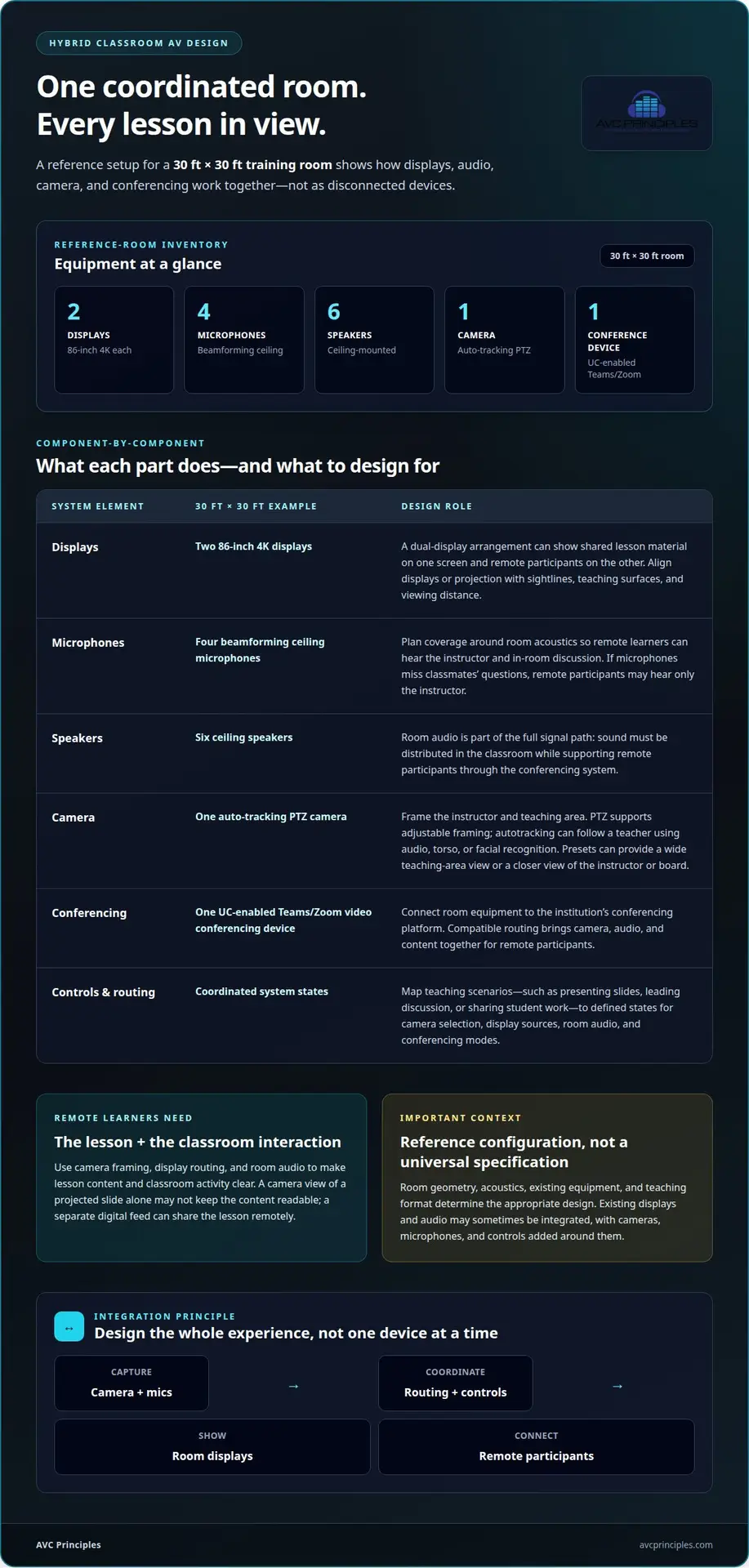
AV design for hybrid learning environments starts with coordinated equipment, not disconnected devices. A 30 ft × 30 ft training room example combines displays, microphones, speakers, a camera, and a conferencing device. Each component has a defined role: capture instruction, distribute sound, show content, or connect remote participants. Integration routes these functions through compatible systems and room controls.
Remote learners need to see lesson content and classroom activity clearly. A dual-display arrangement can show shared material on one screen and remote participants on another. The camera should frame the instructor and teaching area, while room audio carries classroom discussion into the conference. This gives remote students access to both the lesson and the interaction around it.
Camera selection depends on room layout and instructor movement. A pan-tilt-zoom camera provides adjustable framing, while autotracking can follow a teacher using audio, torso, or facial recognition. One auto-tracking PTZ camera appears in the 30 ft × 30 ft example room. Camera presets can provide a wide teaching-area view or a closer view of the instructor or board.
Displays or projection should align with sightlines, teaching surfaces, and viewing distance. The example room uses two 86-inch 4K displays, six ceiling speakers, four beamforming ceiling microphones, and one UC-enabled Teams/Zoom video conferencing device. This is a reference configuration, not a universal specification. Room geometry, acoustics, existing equipment, and teaching format determine the appropriate design.
Existing displays and audio can sometimes be integrated, with cameras, microphones, and controls added around them. The system design must account for how each component connects and how signals reach the conferencing platform. For example, a projector may show a lesson in the room while a separate digital feed shares it remotely. A camera view of a projected screen alone may not keep lesson content readable.
Control integration coordinates camera selection, display sources, room audio, and conferencing modes. Designers map each teaching scenario to a defined system state, such as presenting slides, leading a discussion, or sharing student work. This makes the audio-visual experience more consistent across sessions. In larger facilities, command and control center design principles can inform centralized AV oversight.
Effective AV design for hybrid learning environments connects system choices to actual teaching workflows. Designers consider instructor movement, student participation, and the content remote learners need to see. They then align camera framing, display routing, audio distribution, and controls with those requirements. Performance depends on the complete design, not just an individual device.
2. Faculty training and intuitive classroom controls
Classroom controls should make common teaching tasks straightforward. Instructors should be able to select a lesson source, start conferencing, adjust room audio, and end a session from one clearly labeled interface. Organizing controls around these actions avoids the need to understand signal routing. For example, a “Share laptop” command can send a connected computer’s content to room displays and the remote meeting.
Behind that simple interaction, AV signal routing determines where video and audio go. The design maps inputs, such as an instructor’s laptop or document camera, to room displays, recording, and the conferencing platform. It also defines audio paths between room microphones, speakers, and remote participants. Clear routing prevents instructors from having to select sources on multiple devices during a lesson.
Automation can manage repeatable actions. When a laptop connects, the system can display its content without requiring the instructor to operate a complex switcher. A single “Start class” control can activate the selected camera, room audio, displays, and conferencing mode. The design should retain manual overrides for exceptions, such as switching to a document camera or muting room speakers during a remote presentation.
Classroom AV can be coordinated with an institution’s learning management system to support recorded-session sharing, assignment submissions, and updates. The room’s conferencing workflow should also suit the platform already used by the school, such as Zoom, Microsoft Teams, or Google Meet, so participation and capture fit established teaching processes.
Common hybrid classroom risks include misrouted content, confusing controls, poor microphone pickup, and unreliable Wi-Fi or bandwidth. Students may hear the instructor but miss classmates’ questions if room microphones do not capture discussion. Remote participants may also see a camera view of a projected slide instead of a clean digital content feed. Before the room goes live, end-to-end testing should include an actual remote participant.
Faculty training should follow the same sequence instructors use in class. Practice starting a session, sharing content, changing camera views, handling questions, and ending conferencing. A classroom system should make it possible to start a hybrid lesson in under a minute. Training should also cover recovery actions, such as selecting another display source or restoring room audio, so instructors can respond when a routine connection fails.
Standardized controls make training transferable between classrooms. Consistent labels, source names, and startup sequences reduce differences between rooms. During system design, each control should map to a defined outcome, and each outcome should be tested against faculty workflows. This keeps the audio-visual interface focused on teaching tasks rather than equipment terminology.
3. Classroom microphones and audio processing
Microphone selection starts with the voices a class needs to capture. Ceiling microphones can cover discussion across a teaching space, while lapel microphones keep an instructor audible while moving. Audio processing manages these inputs and sends clear speech to room speakers, conferencing platforms, and recording systems. The design should account for both instructor delivery and student contributions.
Remote students need to hear classmates’ questions and discussion, not just the instructor. A microphone strategy should include student speaking areas, such as seminar tables or active learning pods. For example, a ceiling microphone near group tables can capture contributions without requiring each student to handle a handheld microphone. Designers should map microphone pickup to the room’s seating and teaching patterns.
Room acoustics affect microphone performance. In reverberant classrooms, reflections can overlap with direct sound and make speech less distinct. Acoustic treatment can reduce reflections and distractions, while microphone placement helps capture voices before room noise dominates. A professional assessment considers surfaces, room geometry, speaker locations, and typical class activity together. Adding microphones without addressing these conditions may not resolve unclear speech.
Active learning spaces also shape audio planning. Modular pods support collaboration and group discussion, unlike fixed rows aimed only at the front. Each pod creates a different speaking position, so microphone placement should reflect how students interact. Designers can map discussion zones and instructor movement, then align audio coverage with those locations. This helps remote participants follow exchanges as well as formal lectures.
Lecture capture adds another audio destination. The system must route instructor and student speech into the recording alongside lesson content, so students can review discussions as well as presentations. For example, a class using Microsoft Teams for live participation may also record sessions for later access through its learning platform. The design should define which room sources feed the live call and which are included in recordings.
Classroom planning connects teaching requirements to system design. Designers review room use, seating plans, acoustics, existing audio, and the institution’s conferencing workflow. They then specify microphone coverage, processing, speaker distribution, and recording paths as one coordinated system. A seminar room may prioritize distributed discussion, while a lecture space may emphasize instructor speech and audience questions. These different needs shape system design.
Before commissioning, test the planned audio paths with a real class-style exchange. An instructor speaks from the teaching position, students contribute from discussion areas, and remote listeners assess both. The test can reveal missed pickup zones, excessive reverberation, or uneven speaker coverage. Adjustments to microphone placement, processing, or room treatment can then be made before lecture capture and live conferencing become routine.
4. Displays for lesson content and remote participants
Display design should give each visual source a clear purpose. In a seminar, the main screen can show the instructor’s material while a separate view keeps remote participants visible. Remote learners should receive lesson content as a clean digital feed, not only a camera image of a projected screen. This keeps text and diagrams legible during conferencing.
Display placement is a room-planning decision, not a finish-stage aesthetic choice. Designers assess viewing distance, seating, sightlines, and teaching surfaces before specifying display locations. For example, a screen behind the instructor can force students to turn away during discussion. A coordinated layout supports visibility from front rows, rear seats, and active learning areas.
Interactive displays and whiteboards extend the screen from presentation to participation. Instructors can annotate a diagram during an explanation, then share the marked-up content with remote learners. Smart displays can also connect with student devices for real-time interaction. The design should map how annotations, shared content, and participant video move between the display and conferencing session.
Group displays make collaboration visible across table pods. Students can share work between pods or present it to the full class. For example, a small-group exercise can move from a pod display to the instructor’s main screen for review. This makes content sharing part of the lesson rather than an isolated presentation task.
Display count and format should follow the activity plan. A lecture may need a prominent teaching surface, while a discussion space may benefit from screens positioned for several groups. Designers consider what learners need to read, where participants sit, and whether the instructor needs to annotate or compare materials. These decisions determine the screen arrangement and signal routing.
Remote participation also depends on what the camera captures alongside the displays. A camera view should include the instructor or relevant teaching surface without making projected content the only source remote students receive. For example, when the instructor annotates a slide, the system can share the digital slide while the camera shows the instructor explaining it. This preserves both the visual material and classroom context.
In active learning spaces, display placement should support movement and exchange. Modular pods can face local screens for group work, while shared displays support whole-class review. Designers coordinate screen locations with furniture, camera framing, and accessible routes through the room. The visual system can then support different learning experiences without making remote learners dependent on a single classroom viewpoint.
5. Standardized AV Design for Hybrid and HyFlex Learning
Standardization means using a repeatable design framework, not installing identical systems in every classroom. An educational institution can define room types, such as lecture rooms, seminar spaces, and active learning classrooms, then assign each a consistent operating model. A seminar room may prioritize discussion and group sharing, while a lecture room supports presentation and capture. The control logic and user experience can remain familiar in both.
Hybrid learning brings in-person and remote learners into the same session. HyFlex design must also support different participation modes across scheduled classes. A standard room framework should define how conferencing, content sharing, audio, and recording work in each mode. For example, the same room can support an instructor-led presentation, a seminar discussion, and a recorded lecture without requiring separate, unfamiliar workflows.
Accessibility belongs in the baseline specification, not as a later addition. In United States education settings, design should align with applicable institutional accessibility requirements and the school’s education technology environment. Consider evenly distributed audio, assistive listening, captioning, intuitive controls, and lecture capture compatibility. These functions help make participation and lesson materials available to students using different access methods.
Integration also needs a defined boundary. A standardized design should specify how classroom AV connects with the conferencing platform, learning management system, and content management process. For instance, a recorded session may be routed for later student access, while live sharing supports discussion during class. Modular systems let institutions expand or adapt room functions as teaching needs change, without treating each installation as an entirely separate design.
Consistency across buildings reduces operational variation. A shared interface, source-naming convention, and startup sequence help instructors move between classrooms with less relearning. Standardized equipment categories can also simplify staff training, maintenance planning, and future upgrades. The specification should still allow room-specific adjustments for acoustics, sightlines, existing infrastructure, and teaching format. A small seminar room and a large lecture hall need different coverage, even when their user workflows align.
Implementation should follow the design framework. A pilot room can test teaching workflows, conferencing integration, accessibility functions, and recording before wider installation. Feedback from faculty, students, and IT staff can inform revisions to the standard. Later rooms can follow a controlled design and commissioning process, with documented exceptions for building conditions or instructional requirements. This makes changes manageable across a campus rather than a series of isolated decisions.
Institutions planning consistent classroom systems can develop a standardized AV design around room types, education technology, and future expansion. The central principle is straightforward: standardize the experience and integration logic, then tailor equipment and coverage to each learning space.
AVC Principles: Staged Environment Engineering
AVC Principles helps institutions translate hybrid teaching requirements into coordinated audio-visual systems. Its AV Systems Design and ICT Infrastructure Design address the connections between classroom systems, signal pathways, and supporting infrastructure. For performance or presentation environments, Staged Environment Engineering brings the room’s technical and production requirements into the design.
Engage AVC Principles when planning a new learning space, standardizing classroom systems, or integrating hybrid capabilities into existing facilities. The work can align equipment and infrastructure with teaching modes, room use, and institutional requirements. Contact AVC Principles to discuss your learning environment design needs.
Plan the Next Phase of Your Learning Spaces
The next step is to translate teaching priorities into a design brief that can guide future decisions. Identify which learning modes the institution needs to support, how spaces may change, and where existing infrastructure must connect. This gives AV design for hybrid learning environments a practical foundation for phased planning, system coordination, and long-term adaptation.
AVC Principles offers AV Systems Design and ICT Infrastructure Design for coordinated learning environments, alongside Staged Environment Engineering when staged spaces are part of the project. These services support planning that aligns technical systems with each environment’s intended use. A clear design scope helps decision-makers establish priorities before implementation begins.
Move your learning-space plans forward with a focused discussion. Contact AVC Principles to discuss your project and its design requirements. A considered next step can turn current teaching needs into a coherent foundation for future learning.
Frequently Asked Questions
What equipment do I need for a hybrid classroom?
A hybrid classroom needs systems matched to its teaching activities and room conditions. Start by defining whether classes involve lectures, group work, demonstrations, or a mix. That decision shapes requirements for presenting content, capturing instruction, supporting remote discussion, and recording sessions. Existing projection or audio systems may fit the design, while other rooms may need different components or infrastructure connections.
What AV equipment is needed for a hybrid learning environment?
A typical system may include display or projection systems, room audio, cameras, microphones, conferencing, and controls. Depending on how classes run, it may also include interactive displays, lecture capture, or connections to a learning management system. For example, a course that shares demonstrations may need a way to present physical materials clearly. The design should account for the full teaching workflow, not just the video call.
How do AV designers position cameras and microphones in a hybrid classroom?
Designers plan camera views and microphone coverage around instructor movement, student seating, and teaching activities. A practical review maps where presentations, demonstrations, and discussions happen, then assesses whether those areas are visible and audible remotely. The design team can model intended views and test the installed system with classroom-style activity. This helps identify blind spots, missed speakers, or views that distract from instruction.
Which classroom audio systems best capture student questions?
The right system depends on how students participate. Ceiling microphones can capture discussion across shared spaces, while lapel microphones can keep a moving instructor audible. In a room with table groups, designers assess microphone coverage across discussion areas and account for reverberation. The system should carry student contributions into the conference, not just amplify the instructor for people in the room.
How do AV designers adapt a hybrid classroom to different room sizes and layouts?
Designers adapt the system to room geometry, seating, acoustics, sightlines, and teaching format. A lecture hall may need coverage across fixed seating, while a seminar room with movable tables needs flexible capture for changing discussion zones. Existing displays and audio can also affect the design. The goal is to define signal paths and participant coverage around the room’s actual use, rather than apply one equipment layout everywhere.
What accessibility and education technology standards apply to hybrid learning AV?
Accessible higher-education AV can include evenly distributed audio, video capture and display, intuitive controls, assistive listening, captioning, and lecture capture compatibility. The system should also integrate with the institution’s conferencing platform and learning management system.