
A basic network switch can connect devices, but it may not provide the traffic controls a commercial AV system requires. AV over IP network design best practices begin with managed switches that support the necessary VLAN, QoS and multicast functions. Capacity depends on stream count, resolution, frame rate and compression. For multicast, the design also needs appropriate IGMP configuration.
That is only part of the decision. A network can meet bandwidth requirements and still fail to deliver a reliable system if AV endpoints, HDCP requirements, audio architecture and the control platform are incompatible. Professionals assess these dependencies alongside network topology, segmentation and failover behavior.
This article explains how professionals determine whether managed switching is needed, estimate capacity and separate AV traffic from general IT traffic. It also covers commissioning tests for routing, latency and failover, plus compatibility checks that can reveal design conflicts before deployment. The result is a practical framework for evaluating an AV-over-IP network as an integrated system, not a collection of separate devices.
Key Takeaways
- Determine switch requirements from the AV platform’s traffic model, then account for how multicast streams are managed across the network.
- Assess capacity using concurrent streams, resolution, frame rate and compression, with allowance for future growth.
- Use network segmentation and traffic prioritization to control communication between AV, control, management and other network traffic.
- Commissioning should test routing, latency, failover behaviour and monitoring alerts under realistic operating conditions.
- Check HDCP, audio transport and control-platform requirements together so compatibility is considered across the complete AV system.
1. How does a professional determine whether Networked AV needs managed switches?
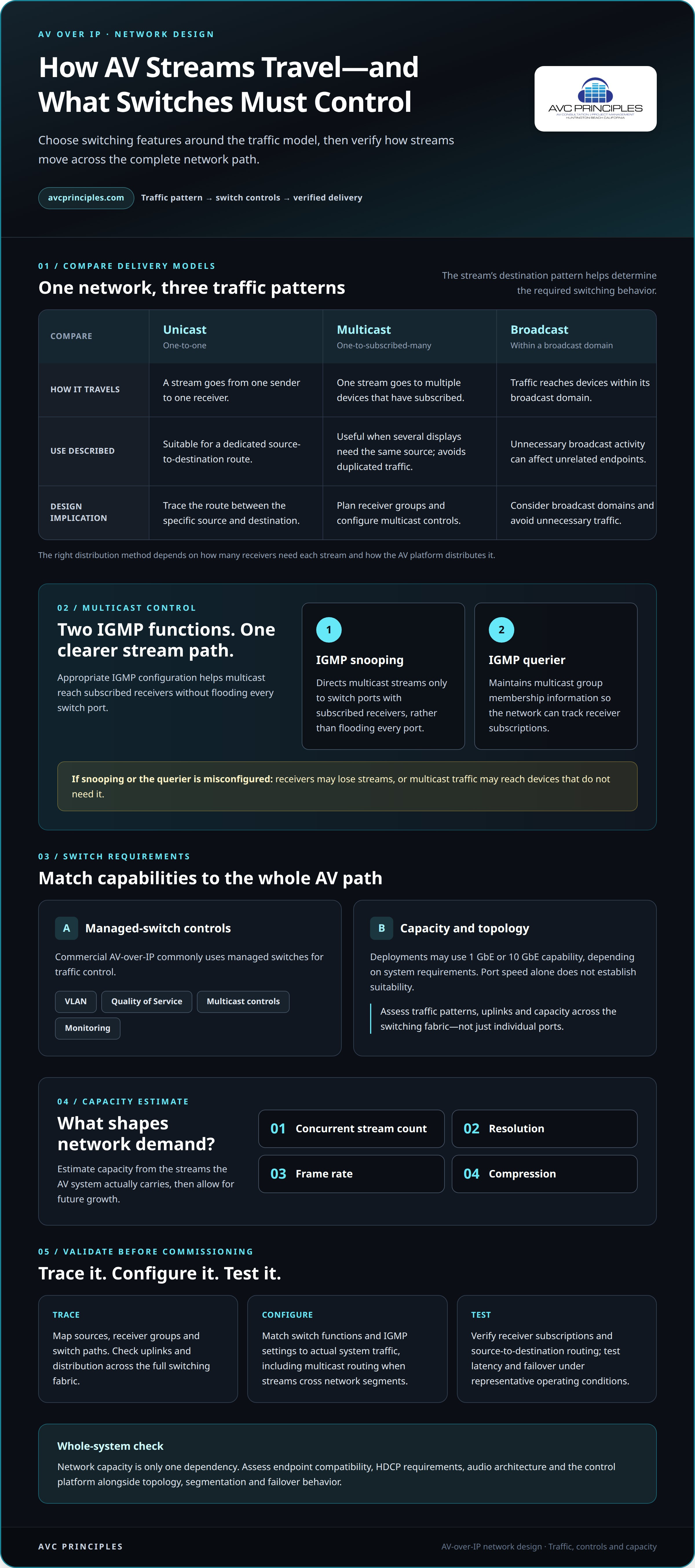
A professional starts with the AV platform’s traffic model, endpoint count and distribution paths. Unicast sends one stream from one sender to one receiver, making it suitable for dedicated routes. Multicast sends one stream to multiple subscribed devices, reducing duplicated traffic when several displays need the same source. Broadcast traffic reaches devices within its broadcast domain, so unnecessary broadcast activity can affect unrelated endpoints. These distinctions help determine the switching features and configuration required.
Managed switches are commonly used in commercial AV-over-IP installations because they provide VLAN, Quality of Service and multicast controls. Deployments may use 1 GbE or 10 GbE capability, depending on system requirements. A professional checks whether each switch supports the required functions, then traces how streams travel between sources and destinations. Port speed alone cannot establish suitability. Traffic patterns, uplinks and capacity across the switching fabric also matter. Applying AV over IP network design best practices starts with this whole-path assessment.
For multicast distribution, IGMP configuration is central. IGMP snooping lets a switch direct multicast streams only to ports with subscribed receivers, rather than flooding every port. The network also needs an IGMP querier to maintain multicast group membership information. Without appropriate snooping and a querier, receivers may lose streams, or traffic may reach devices that do not need it. The professional maps sources, receiver groups and switch paths, then configures and tests membership behavior.
Multicast routing matters when streams must cross network segments. The design accounts for how multicast traffic moves between those segments, alongside IGMP controls on the switches. Unicast may be more suitable for a dedicated source-to-destination route. The choice depends on how many receivers need each stream and how the AV platform distributes it. Mission-critical audio networks call for enterprise-grade managed switches that support VLAN configuration, monitoring and traffic management. Matching switch functions to actual system traffic is another key AV over IP network design best practice.
Typical equipment and installation costs depend on system scale, switch requirements, cabling, endpoint count and integration scope; project pricing is provided after a quote request. A professional scopes those elements together because the switching design affects the wider network architecture.
Cabling and fiber requirements depend on endpoint interfaces, bandwidth needs, route length and site conditions. A professional selects the transmission medium and pathway to suit the equipment and the connection between each source, switch and receiver.
Common risks include unmanaged switches without the required multicast controls, incorrect IGMP settings, insufficient uplink capacity and poorly planned distribution. A professional traces each stream path, validates switch configuration and tests receiver subscriptions before commissioning. This makes network behavior observable and helps identify configuration errors that could disrupt AV delivery.
2. Commissioning, failover testing, and monitoring
A professional plans commissioning around the system’s signal paths, network configuration and failure modes. The process begins with an inventory of AV endpoints, switch connections and redundant links. The design team records expected routing, bandwidth use and monitoring requirements before testing. This baseline helps technicians distinguish a device fault from a network issue.
Commissioning then validates actual operation against the design. Technicians test source-to-destination routing, confirm each endpoint receives its assigned stream and observe latency under representative traffic. Some audio-over-IP monitoring applications may require sub-millisecond latency, so measurement methods must match the application’s timing needs. The team also reviews monitoring alerts to confirm that a meaningful event, such as a disconnected endpoint, produces a visible notification.
Failover must be tested as an operating condition, not assumed from the presence of duplicate cables. A professional simulates a failed link or equipment fault, then observes whether traffic moves to the redundant path and AV operation continues. AoIP designs can use redundant paths with automatic failover to maintain operation during equipment failures or cable damage. Testing records the simulated fault, the system response and any interruption observed.
Clock resilience deserves a separate test. AoIP systems can use multiple clock sources with automatic failover to prevent system-wide synchronization failures. A commissioning plan verifies that the alternate source takes over when the primary source becomes unavailable. Technicians then check synchronization across connected devices and investigate any loss of timing or audio continuity.
Network monitoring should expose the information needed to diagnose problems. The professional configures alerts for relevant switch, link and endpoint conditions, then checks that each alert reaches the intended monitoring interface. Remote monitoring can give authorized technical teams visibility into device status and network events without requiring every observation to happen at the equipment rack. Access controls and secure management interfaces remain part of the security design.
Planning, configuring, testing and troubleshooting an AV-over-IP network involves documenting the topology, mapping routes, configuring the network, then validating routing, latency, failover and alerts. When a test fails, the team traces the affected path across the device, switch port and cables, corrects the issue and retests.
Commissioning records should preserve switch configurations, test results, alert behaviour and the final topology. These records give operations teams a useful baseline when later deployments add endpoints or change routes. A structured AV network design and commissioning approach connects those tests to the system architecture, rather than treating commissioning as a final, isolated task.
3. Managed Ethernet switches and network capacity
A professional selects switches against the AV platform’s traffic model, not port count alone. The assessment covers concurrent streams, endpoint connections, switching capacity and uplink speeds. Some AV-over-IP deployments work on 1 GbE, while 4K systems may require 10 GbE. These are design possibilities, not universal thresholds. The actual requirement depends on resolution, frame rate, compression profile and simultaneous source-to-display routes.
Switch configuration must support the platform’s distribution method. For multicast, the professional validates IGMP support and configures snooping and a querier. For time-sensitive media, QoS settings help prioritize traffic according to system requirements. The switch’s backplane capacity and uplinks also need validation. A fast access port cannot compensate for an oversubscribed uplink carrying several concurrent streams between network segments.
Capacity planning starts with a stream inventory. The professional records each source, destination, format and route, then estimates bandwidth for concurrent use. A display wall receiving several feeds creates a different switching load from a room showing one source. The design also reserves headroom for growth. Future endpoints, additional streams and higher-resolution sources can increase demand across access ports and uplinks.
Topology shapes network demand. Audio-over-IP networks commonly use a star topology, with devices connected to a central switch. For video, the professional maps where streams enter, cross uplinks and reach receivers. A mesh that distributes every remote-site feed to every other site can create unnecessary traffic. The U.S. Environmental Protection Agency described a utility configuration where this pattern contributed to poor network performance.
Segmentation helps define which traffic shares each switching path. A typical AV network may separate video, control, management, client data and guest traffic into distinct VLANs. The professional aligns those segments with routes and uplink capacity, then evaluates how traffic crosses between them. This connects capacity planning to the wider switching design, rather than treating each VLAN as an isolated bandwidth pool.
Selecting switches combines port requirements, media demand and operational priorities. For each switch, the professional evaluates supported features, backplane capacity, uplink speed and its role in the topology. They then model expected concurrent streams and planned expansion, configure the required traffic handling, and validate performance under representative use. A capacity plan should document its assumptions, including formats, routing patterns and reserved headroom.
For projects such as command centers, where multiple feeds may need controlled distribution, switch capacity affects operational flexibility and system response. The professional aligns the network architecture with how operators need sources delivered, rather than distributing every stream everywhere. This targeted design can limit unnecessary switching traffic while preserving capacity for required routes and future expansion.
4. What Is Network Segmentation?
Network segmentation separates AV traffic into logical groups, commonly using VLANs on managed switches. A typical design assigns distinct segments to AV video, AV control, management, client data and guest traffic. This structure limits unnecessary communication between devices and gives network teams clearer control over how streams cross the infrastructure.
VLAN tagging identifies the segment associated with Ethernet traffic as it moves through compatible switches. A professional maps each endpoint to its intended VLAN, then configures switch ports and uplinks to carry the required tagged traffic. For example, a control processor may need access to AV endpoints, while guest devices remain isolated from video and control systems.
Segmentation also depends on routing and firewall policies. Firewall rules can allow a control system to reach the AV devices it manages while blocking unnecessary inter-VLAN communication. The professional documents these permitted paths and tests them against actual system functions. This preserves required control while limiting access from corporate, client or guest networks.
Quality of Service, or QoS, manages traffic priority when network resources are shared. DSCP markings identify traffic classes so compatible network hardware can handle time-sensitive packets according to the configured policy. AV networks can prioritize control signals highest, followed by audio and then video. The professional aligns markings across devices and switches, since inconsistent settings can prevent intended prioritization.
QoS does not create additional bandwidth. Instead, it helps manage competing streams during congestion, reducing the likelihood that less time-sensitive traffic delays real-time AV packets. For an audio-over-IP system, DSCP markings can identify time-sensitive packets for priority handling over routine data. The design must apply the policy consistently along the traffic path, including relevant uplinks.
Codec selection affects bandwidth, image quality and implementation cost. Compression methods trade bandwidth demand against image fidelity and processing requirements; the balance depends on resolution, frame rate and the chosen codec. Hardware and endpoint requirements also shape implementation costs, so the design compares complete system needs rather than codec labels alone.
Latency, jitter and packet loss affect delivery in different ways: latency delays a stream, jitter varies packet arrival timing, and packet loss removes data from the stream. These conditions can disrupt synchronization, produce audio or image artifacts, or interrupt control response. No single numeric limit fits every AV platform. The professional sets acceptance criteria based on application and platform requirements, then measures performance during commissioning.
For scalability, segmentation plans should account for future streams and devices. A professional records VLAN assignments, tagging, DSCP policies and firewall paths in the network documentation. This gives operations teams a clear reference when infrastructure changes, new AV hardware is added or a control route needs adjustment.
5. Compatibility with HDCP, audio systems, and control platforms
Network capacity alone does not establish whether an AV-over-IP system will work as intended. A professional checks the complete signal chain: source, encoder, network, decoder, display and control platform. Each connection must support the formats and functions required for the intended environment. A mismatch at any point can affect the whole route, even when network switching performs correctly.
For protected video, the design must account for HDCP across the source-to-display path. The professional identifies where HDCP-protected content originates, traces its route through AV devices and confirms that the receiving display supports the required protection. They also consider how the AV platform handles the protected signal. Testing representative content across each intended route helps reveal compatibility issues before operational handover.
Audio needs its own compatibility assessment. The design team compares channel requirements, routing, synchronization and the audio platform’s network transport. Traditional digital audio systems typically carry 8–64 channels per connection, while a network cable can carry hundreds of audio channels bidirectionally. That difference can affect how an enterprise routes audio between rooms, stages or control positions. The selected network architecture must support the required audio paths and connected devices.
Control integration is another distinct layer. A professional maps commands from the control platform to the AV endpoints they operate, including source selection, display control and routing actions. The review covers how devices communicate, what status information returns and whether control traffic can reach the required endpoints. A system that transports video successfully may still be operationally incomplete if control actions or feedback fail.
Quality of Service settings should align with the AV platform and its traffic. The professional assesses how audio, video and control interact under concurrent use, then validates that configured priorities support the intended operation. The goal is not simply to connect equipment, but to make the complete signal and control workflow function across the installed infrastructure.
Compatibility testing should use representative sources, displays, audio endpoints and control sequences. The professional records each tested route and notes whether content, sound, synchronization and commands behave as designed. For example, a deployment with several display types needs route tests for each display class, not only one convenient endpoint. This creates a useful acceptance record for future system changes.
For staged environments, command centers and other integrated systems, assess compatibility during design rather than after equipment selection. Plan an integrated AV systems design around the required content, audio paths and control workflows before deployment.
AVC Principles
AVC Principles helps align AV system requirements with network architecture, capacity planning and commissioning criteria. Its design work considers how video, audio and control platforms interact, including multicast distribution, segmentation, failover and compatibility across connected equipment. This is especially useful when a project involves multiple endpoints, shared network infrastructure or operationally critical AV routes. Through AV Systems Design and ICT Infrastructure Design, AVC Principles develops an integrated design around the system’s intended use and technical dependencies. For more complex operational needs, the design can also address command and control environments or staged systems. Contact AVC Principles to discuss your AV over IP network design requirements.
Set the design basis for the next phase
The next step is to turn operational requirements into a shared design basis. Identify how people will use each space, which sources must reach which destinations, and how audio and control fit into daily operations. Include expected changes, such as new displays or additional signal routes, so the architecture can accommodate growth instead of treating each change as an isolated addition.
Applying AV over IP network design best practices at this stage means aligning technical decisions with the project’s purpose. A clear brief gives the engineering team context to coordinate AV and ICT requirements, evaluate integration dependencies and define what commissioning must demonstrate. It also helps stakeholders make decisions before equipment choices or installation constraints narrow the available options.
AVC Principles can help translate those requirements into a coordinated design for the project. If you’re ready to discuss your system’s needs, contact AVC Principles. A well-defined starting point supports a more deliberate path from concept to operation.
Frequently Asked Questions
Do I need a managed switch for Networked AV?
Managed switches are generally appropriate when an AV platform needs configurable traffic handling or network visibility. A small, dedicated unicast route may have different requirements from a system distributing multicast to multiple receivers. The professional assesses the platform’s supported network functions, operational criticality and integration with enterprise infrastructure. For mission-critical audio, monitoring and traffic controls are important design considerations, not optional conveniences.
What Is Network Segmentation?
Network segmentation divides a network into controlled zones, reducing unnecessary communication between groups of devices. For example, a venue can place AV endpoints in zones separate from staff computers and guest access. The design then defines which services must cross between zones, such as communication between a control processor and displays. This supports clearer access policies and makes it easier to isolate faults or review traffic paths.
What Is a VLAN in AV Networks?
A VLAN is a logical network segment configured on switches, separate from physical cabling layout. For example, video endpoints on different switch ports can share an AV VLAN, while management devices occupy another. A subnet provides the IP addressing structure for devices, while VLAN configuration controls their Layer 2 grouping. Coordinating VLAN and subnet plans helps prevent addressing conflicts and supports deliberate routing between AV functions.
What is AV-over-IP?
AV-over-IP transports audio, video or control signals across an IP network instead of relying only on direct point-to-point connections. Encoders or network-capable sources place media onto the network, and compatible receivers deliver it to displays or audio endpoints. This architecture can support flexible routing across rooms or facilities. Its performance depends on the media platform, network configuration and compatibility of connected devices.
What network bandwidth is required for AV over IP systems at 4K and 8K resolutions?
There isn’t one bandwidth figure that applies to every 4K or 8K system. Required capacity depends on the codec, compression profile, frame rate, signal format and number of simultaneous streams. A professional calculates demand from the actual platform specifications and planned routes, then considers peak concurrent use and future expansion. The resolution label alone doesn’t show the network load or the image quality trade-offs.
What VLAN and subnet design practices are recommended for AV over IP networks?
Plan VLANs around operational roles, such as video, control and network management, then assign IP subnets to support those zones. Document gateways, address ranges and permitted inter-VLAN routes together. For example, a control processor may need a defined path to displays, while guest devices should remain separate. A consistent naming and inventory scheme helps operations teams identify the right segment when expanding or troubleshooting the system.
Should AV over IP use 1GbE, 10GbE, or higher-speed links, and how should uplinks be sized?
Some AV-over-IP deployments operate on 1 GbE, while 4K systems may require 10 GbE. Higher-speed links depend on the platform’s capacity requirements and the combined traffic crossing each connection. Uplink planning should aggregate the concurrent streams that share that path, including traffic from multiple access switches. The design also needs capacity headroom, so expansion doesn’t immediately overload a link or constrain routing flexibility.
How should redundancy, failover, and network security be designed for AV over IP?
Design redundancy around components and paths whose failure would interrupt required operations. A professional can provide alternate network paths and test whether traffic shifts as intended after a simulated fault. Security measures include access controls, secure management interfaces and current firmware. Documenting topology, device inventory, switch settings and firewall rules gives operations teams a basis for reviewing changes and responding to network events.