
Accessible AV is part of a public venue’s access plan, not just its presentation infrastructure. ADA compliance for AV systems in public venues depends on whether the space and its communication functions are accessible to people with disabilities. The U.S. Department of Justice requires assistive listening systems in assembly areas where audible communication is integral to the space.
Venue teams know that clear sound and visible content are essential to a successful event. Accessibility also depends on how attendees receive spoken information, read captions, operate controls, and navigate the venue.
This article explains how assistive listening, live captions, and accessible AV controls relate to ADA requirements. It also covers why requirements can vary by venue and space, and how accessibility shapes AV system design.
Key Takeaways
- Accessible AV design covers controls, displays, and the physical routes around them, not just the equipment itself.
- Assistive listening requirements depend on the assembly area and its use; receiver compatibility and clear availability information are also important.
- Live captions and sign language interpretation provide different ways to make spoken content accessible during events.
- Title III requirements apply to public accommodations and commercial facilities, while the relevant standards depend on the facility and work being done.
- Early coordination of AV systems, room layouts, and infrastructure can help address access needs as part of the overall design.
Accessible AV control interfaces
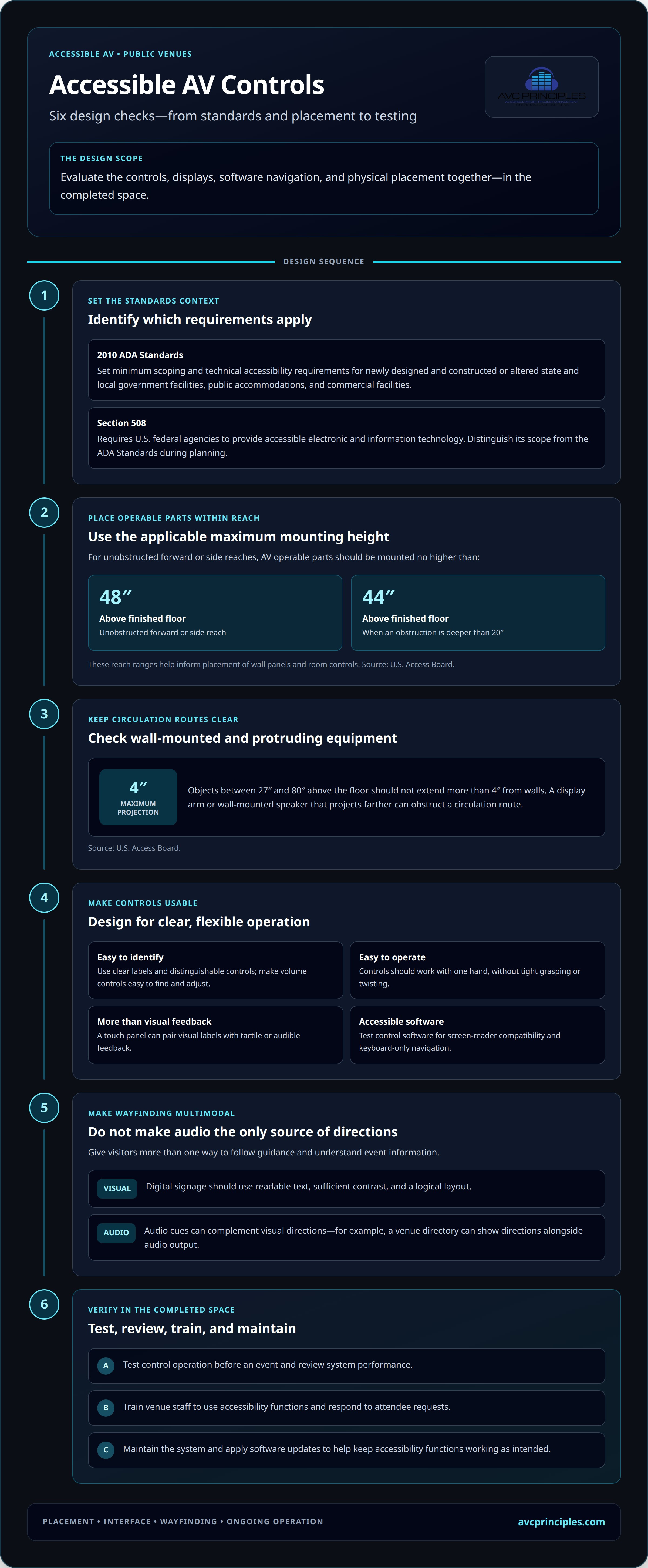
Accessible controls, displays, and routes are central to ADA compliance for AV systems in public venues. A touchscreen, room microphone, or digital sign can create a barrier if people with disabilities cannot reach or understand it. Design must account for both the interface and its physical placement.
For unobstructed forward or side reaches, AV operable parts should be mounted no higher than 48 inches above the finished floor, according to the U.S. Access Board. When an obstruction is deeper than 20 inches, the maximum mounting height is 44 inches above the finished floor, also according to the U.S. Access Board. These reach ranges help inform placement of wall panels and room controls.
Physical clearances matter, too. Protruding objects between 27 and 80 inches above the floor should not extend more than 4 inches from walls, according to the U.S. Access Board. A display arm or wall-mounted speaker that projects farther can obstruct a circulation route.
Interfaces should use clear labels and distinguishable controls. They should be operable with one hand, without requiring tight grasping or twisting. A touch panel can pair visual labels with tactile or audible feedback. Volume controls should be easy to find and adjust. Test control software for screen-reader compatibility and keyboard-only navigation.
Wayfinding technology needs a clear visual structure. Digital signage should use readable text, sufficient contrast, and a logical layout. Audio cues should not be the only way to convey directions or event information. For example, a venue directory can show visual directions alongside audio output, giving visitors more than one way to follow guidance.
For new construction and alterations, scoping and technical criteria guide different parts of design. The 2010 ADA Standards set minimum scoping and technical accessibility requirements for newly designed and constructed or altered state and local government facilities, public accommodations, and commercial facilities. Section 508 of the Rehabilitation Act requires U.S. federal agencies to provide accessible electronic and information technology. Project teams should distinguish these standards’ scopes when planning interfaces and content.
In practice, ADA compliance for AV systems in public venues means evaluating controls, displays, software navigation, and placement in the completed space. Test operation before an event, review system performance, and train venue staff to use accessibility functions and respond to attendee requests. Maintenance and software updates help keep these functions working as intended.
What Are Assistive Listening Systems?
Assistive listening systems deliver amplified audio directly to listeners through compatible receivers or hearing aids. They support access to speech at events where sound carries essential information.
Assistive Listening System Types
FM systems transmit sound by radio, infrared systems use light, and induction loops send audio to compatible hearing aids. Each approach delivers the source audio to listeners while reducing the effect of room noise. The system type affects receiver use, room coverage, and integration with the venue’s sound system. These factors shape how attendees access presentations and announcements.
Assembly Area Requirements and Receiver Counts
The ADA requires assistive listening systems in assembly areas where audible communication is integral to the space, according to the U.S. Department of Justice. Under the ADA requirements described by the Department, venues with up to 50 seats must provide at least two receivers. Receiver quantities scale with seating capacity, so a larger room requires planning based on its occupancy and applicable requirements.
For fixed-seating assembly areas with audio amplification, assistive listening systems are required, and at least 4% of fixed seats must have access to an assistive listening device. Under the 2010 ADA Standards, at least 25% of required assistive listening receivers must be hearing-aid compatible, according to the U.S. Department of Justice. This compatibility gives patrons a direct listening option with suitable hearing aids.
Signage helps attendees find the service before an event begins. ADA requirements call for signs informing patrons that assistive listening is available. Signs must include the International Symbol of Access for Hearing Loss and meet applicable character requirements. Placing them near entrances, ticket areas, or the assembly space helps attendees locate the service without searching during a presentation.
Public address systems and microphones should send clear speech to the assistive listening system, not just to room loudspeakers. Integration lets listeners receive event audio directly, including announcements and microphone speech. The system should cover accessible seating areas so wheelchair users can use hearing assistance from their chosen locations.
Accessible seating with AV access involves more than providing a place to sit. Displays should be visible from accessible seating, with clear sightlines to the stage and presentation content. Assistive listening coverage should also extend to these areas, connecting visual and audio access during events.
Costs depend on system technology, coverage, receiver quantities, integration, and the captioning arrangement. AV design pricing depends on project scope and these requirements, with pricing provided after a quote request.
For venues planning system integration, AV Systems Design can address assistive listening within the broader audio-visual design.
What Are Live Captioning and Transcriptions?
Live captions turn spoken words into text as an event takes place. Real-time transcription can appear on venue screens, personal devices, or meeting platforms. For attendees with hearing disabilities, these formats make spoken communication visible. They can also help people follow unfamiliar names, technical terms, or speech in a large room.
Captioning can be generated automatically or provided by a human CART professional. Human CART providers typically achieve 98-99% accuracy. Accuracy matters when captions carry names, specialist vocabulary, or instructions that affect participation. A venue can supply speakers’ names, agendas, and technical terms ahead of an event, helping the captioner prepare for the material.
Live captions and sign language interpretation provide different forms of access. Captions present spoken language in writing, while an interpreter conveys communication through sign language. Neither format replaces the other for every attendee. For a panel discussion, organizers can plan a visible caption display and position the interpreter where attendees can see them without obstructing the presentation.
Recorded video also needs an accessible text alternative. Captions should include spoken dialogue and meaningful audio information, such as a sound that signals a change of scene. A transcript gives readers a separate text version. For a training video, captions support viewing without sound, while a transcript can help attendees find a specific instruction after the session.
Placement affects access. A caption screen should be visible from audience seating without forcing attendees to choose between reading text and watching the speaker. If the venue uses presentation slides, captions need enough screen space to remain legible alongside the visual content. Testing the display from different seats can reveal blocked sightlines or text that is hard to follow.
Real-time captioning also depends on signal flow. The event audio feed must reach the captioning system clearly, and captions must reach the intended displays or digital platform. A microphone change, remote speaker, or audience question can interrupt that chain if the source audio is missed. Event run-throughs should include each speaker, microphone, video clip, and audience-question format.
Digital access has a related but distinct standard. For covered state and local government web and mobile content, the U.S. Department of Justice rule requires WCAG 2.1 Level AA conformance. That requirement concerns covered digital properties; it does not define every live-event captioning setup. Coordinating event screens, online streams, and accessible recordings helps maintain communication access across the event experience.
Title III requirements for public accommodations and commercial facilities
Public accommodations and commercial facilities are subject to Title III regulations and applicable ADA Standards. State and local requirements may also apply. California uses the California Building Code to define assistive listening requirements.
Hearing-Loop Receiver Requirements
A hearing loop transmits audio to compatible hearing aids, so separate hearing-aid-compatible receivers aren’t required in assembly areas with loops. Other assistive listening system types have receiver compatibility requirements under the 2010 ADA Standards. This distinction affects equipment planning: a venue’s system technology determines whether patrons use receivers or compatible hearing aids to access amplified speech.
Venue AV Standards
Venue AV standards address both physical access and digital communication. The 2010 ADA Standards set minimum scoping and technical requirements for newly designed and constructed or altered state and local government facilities, public accommodations, and commercial facilities. For covered state and local government web and mobile content, the U.S. Department of Justice requires WCAG 2.1 Level AA conformance.
Which ADA standards apply to audiovisual systems in public venues? Title II or Title III coverage determines the relevant provisions, including applicable assembly-area requirements in sections 221 and 802 of the 2010 Standards. Public accommodations and commercial facilities must follow Title III regulations at 28 CFR part 36, subpart D, and the 2004 ADAAG at 36 CFR part 1191, appendices B and D.
Title II covers state and local government facilities, while Title III covers public accommodations and commercial facilities. For a venue, the distinction matters because the applicable regulations and facility obligations depend on who operates the space and its use. The 2010 Standards address physical elements; WCAG 2.1 Level AA applies to covered government web and mobile content.
Can state or local accessibility rules add requirements beyond the ADA for venue AV systems? They can include applicable building-code provisions. California, for example, uses its Building Code to define assistive listening requirements. AV planning must account for the venue’s jurisdiction as well as federal standards.
For assembly areas where audible communication is integral, the U.S. Department of Justice requires assistive listening systems under section 219.2. A hearing loop sends audio directly to compatible hearing aids; other systems use receivers, with required hearing-aid compatibility under the applicable standards. Clear signage also informs patrons that hearing assistance is available.
AV design should coordinate the physical system with accessible digital information. A government facility might need both an accessible meeting-room control system and digital content that meets WCAG 2.1 Level AA. Treating these as separate requirements helps teams identify which standards govern each system component, rather than assuming one accessibility measure covers the entire venue.
ADA coverage of assembly areas and public spaces
The ADA’s reach extends beyond the auditorium stage to the public spaces where people receive information, move through the venue, and participate in events. For AV planning, consider how the system and surrounding space work together for attendees with disabilities.
Coverage depends on the facility and its operator. Hotels, conference centers, schools, government buildings, and event venues are examples of spaces where ADA requirements may apply. State and local government facilities fall under Title II, while public accommodations and commercial facilities fall under Title III. Applicable standards depend on the facility’s legal category and the work being designed or altered.
Assembly areas covered by Title II or Title III must comply with the applicable 2010 ADA Standards provisions, including sections 221 and 802. Those provisions address assembly-area access and accessible seating. Their relevance to AV design is practical: seating, displays, sound, and controls need to function as one coordinated environment, rather than treating accessibility as an equipment-only issue.
Accessible seating should be distributed throughout the venue rather than isolated in one section. AV layouts should preserve views of screens and presenters from these locations. For example, a camera tripod or temporary display can block a sightline even when the fixed screen is visible. Place cables and production equipment so they do not block accessible routes or create tripping hazards.
Communication access includes both visual and audible information. Emergency notifications should pair clear audio with visual alerts on screens, so the message reaches people who cannot access one format. Event displays should be visible from accessible seating, and captions and other visual content should be legible. A single audio announcement or screen-only alert can leave some attendees without essential information.
AV planning should account for the entire event footprint. A venue may have accessible seating in its main hall, but a temporary registration kiosk, information display, or camera position can affect access elsewhere. Reviewing the room layout alongside the AV plan helps identify conflicts involving equipment placement, circulation, audience sightlines, and communication functions.
Historic properties require special consideration. Alterations must follow applicable historic-property provisions to the maximum extent feasible. If physical access would threaten or destroy a property’s historic significance, alternative access methods are required under applicable requirements. Early coordination matters when AV changes affect protected spaces or fixed architectural features.
The practical takeaway is to assess AV as part of the complete public environment. In an auditorium, consider accessible seating, display visibility, sound communication, and unobstructed routes together. Integrating these requirements during design can help venues create spaces where attendees with disabilities can receive information and participate in the same event.
AVC Principles: AV Systems Design
AVC Principles provides AV Systems Design for venues integrating accessibility into a new system or facility alteration. The design can coordinate assistive listening, caption displays, control interfaces, sightlines, and room infrastructure. This is especially useful when AV decisions affect accessible seating, circulation routes, or how attendees receive event information.
For complex operational spaces, Command and Control Center Design can address accessible AV interfaces and communication needs within the room’s system architecture. Early design coordination helps identify dependencies between technology, layout, and infrastructure before they become implementation constraints.
Contact AVC Principles to discuss AV system design for your venue.
Plan the Next Design Decision
Accessibility works best when system architecture, room layout, and infrastructure are considered together. For ADA compliance for AV systems in public venues, define how attendees will use the space, receive event information, and interact with AV throughout the venue. That design brief can guide decisions for new construction, renovation, and system upgrades.
AVC Principles can coordinate AV Systems Design with ICT Infrastructure Design and Staged Environment Engineering when a project requires planning across technology and event spaces. The scope should reflect the venue’s operational needs and applicable accessibility requirements. A clear project discussion can establish priorities and show how the design disciplines fit together.
Contact AVC Principles about accessible AV to discuss your venue’s design needs. A considered starting point can help move accessibility from a separate requirement into the structure of the project.
Frequently Asked Questions
What are some specific ADA considerations when designing A/V systems?
Plan for access across control operation, audience sightlines, and communication formats. For example, a meeting room design can place controls within reach, preserve display views from accessible seating, and route presentation audio to hearing assistance. Consider where temporary equipment, such as cameras or cables, will be placed during events. These decisions connect AV systems to the venue’s physical layout and help prevent one element from obstructing another.
Why Are ALS Required Under the ADA?
Assistive listening systems provide direct access to audible communication in assembly areas where that communication is integral to the space. A theater, lecture room, or courtroom may rely on amplified speech for its primary activity. The system sends sound to listeners more directly than room speakers alone, helping reduce the effects of background noise and reverberation. This supports participation for attendees who have difficulty hearing speech in the room.
When are assistive listening systems required, and how many receivers must venues provide?
The ADA requires assistive listening systems in assembly areas where audible communication is integral. In fixed-seating assembly areas with audio amplification, access to devices must cover at least 4% of fixed seats. Venues with up to 50 seats must provide at least two receivers. Under the 2010 ADA Standards, at least 25% of required receivers must be hearing-aid compatible. A hearing loop changes the receiver compatibility requirements.
What ADA requirements apply to captioning and accessible displays in public venues?
Accessible event communication should not depend on sound alone. Captions can make spoken content visible during live presentations and video playback, while display layout should keep text readable from audience seating. Department of Justice requires WCAG 2.1 Level AA conformance. That digital rule is distinct from the design of a venue’s live-event screens.
What accessibility standards apply to touchscreens, kiosks, and AV control panels?
Controls should be reachable, understandable, and operable without tight grasping or twisting. According to the U.S. Access Board, unobstructed forward or side reaches should place AV operable parts no higher than 48 inches above the finished floor. A deeper obstruction changes the maximum height to 44 inches. Interface design should also consider clear labels, distinct buttons, and software access through keyboard navigation or screen readers.
How do ADA requirements differ for new construction, renovations, and existing venues?
The 2010 ADA Standards set scoping and technical requirements for newly designed and constructed or altered facilities. Existing facilities can involve different obligations, depending on the facility type, alteration, and applicable regulations. Historic properties must follow relevant historic-property provisions to the maximum extent feasible. If physical access would threaten or destroy historic significance, alternative access methods apply. These distinctions make project scope and facility status important parts of accessibility planning.
What penalties, complaints, or legal risks can result from noncompliant venue AV systems?
Noncompliant venue AV systems can create legal and accessibility risks, particularly when they limit access to event information or participation. A system that blocks access to event information or participation can also contribute to an accessibility complaint or legal dispute. Risk can involve more than a single device: inaccessible controls, missing communication access, or obstructed accessible seating may affect the attendee’s experience across the venue.
What are the costs of ADA-compliant assistive listening and captioning systems?
Actual costs depend on technology, coverage, receiver quantities, integration, and captioning arrangements.